Rhythm practice when your timing drifts
Contents
Check this first
"My rhythm is off" can mean several things. Seeing how your own timing drifts before you change your practice makes it easier to choose what to do next.
- Turn on "Tap timing" under "Rhythm practice" in the settings (on computers and tablets, in the right column)
- Press play at a tempo you can tap comfortably. After a bar of count-in, tap along with the sound on the display in the middle or on "HIT" (T on a computer keyboard)
- Watch the white lines. The middle is the sound, the left is early and the right is late
- Stop after 16 taps or more and the practice summary shows your spread. From 24 taps it also tells you whether you were rushing or dragging

Lines sitting a little to the left are natural. Many people tap slightly ahead of the sound, and your device and earphones move the lines too. What to look at is how tightly they group. If they look far off, set Sound and display sync first. The controls are explained in the user guide.
When you rush
Rushing means gradually getting faster than the tempo as you play. If the summary says "Gradually rushing", try the following.
- Slow down: take the places where you rush down to a tempo you can tap comfortably. Watch how the lines group rather than how fast you go
- Wait for the sound: instead of reaching for the sound, listen and wait for your next hit
- Add a subdivision: with eighth notes you can hear how long the space between beats is, which makes it harder to hurry ahead
- Check it in silence: if the summary after gap practice says you were ahead on return, your tempo is rising while there is no sound. Try fewer silent bars
When you drag
Dragging means gradually falling behind the tempo as you play. It can happen in hard or busy passages. If the summary says "Gradually dragging", try the following.
- Get ready early: prepare your hands, fingers or breath for the next note sooner than feels necessary
- Repeat just that spot: take only the bars where you fall behind and repeat them at a tempo you can tap comfortably
- Build up slowly: use the speed trainer to climb little by little from a tempo you can play without stopping
- Check it in silence: if the summary after gap practice says you were behind on return, your tempo is sinking while there is no sound. Try counting all the way through the silence
When you lose the offbeat
The offbeat is the note between two beats. It is easy to get pulled back onto the beat without noticing. Start by getting used to where the note sits, with only the offbeats sounding.
- Use the button below to open a setup where only the offbeats sound
- Step on each beat with your foot and tap along with the sound
- Once it feels steady, stop your foot and keep tapping. In tap timing, the offbeat you hear is the middle of the lines
Opening this changes your time signature, subdivision and accents, and sets the sound to Click. The tempo stays as it is.
Lock in on beats 2 and 4
Here only beats 2 and 4 sound. You count beats 1 and 3 yourself, so you practice feeling the beat without leaning on the sound.
- Use the button below to open a setup where only beats 2 and 4 sound
- Count beats 1 and 3 in your head and tap along with the sound
- In tap timing, beats 1 and 3 count as the middle of the lines too. Tap only on 2 and 4, or on every beat, whichever you like
Opening this changes your time signature, subdivision and accents, and sets the sound to Click. The tempo stays as it is.
When slow tempos are hard
At a slow tempo the notes are far apart, so it is harder to feel where the next one lands. Finding slow tempos harder than fast ones is common.
- Add a subdivision: with eighth notes, the notes in between give you something to hold on to. Playing quarter notes at 60 BPM or below brings up a suggestion you can act on right there
- Keep the subdivision in your body: say the notes in between out loud, or step them with your foot
- Go back when it feels steady: return to quarter notes and try the same tempo
Keep the beat without the sound
Even if you can stay with the sound, your tempo may move once it stops. Gap practice checks whether you can hold the same tempo while the sound and light are gone.
- Turn on "Gap practice" under "Rhythm practice" in the settings. Start with "Play" at 4 bars and "Silent" at 2 bars, as they are set at first
- While the sound and light are gone, keep tapping at the same tempo or keep counting in your head
- When the sound comes back, check whether it matches your beat
- Once that feels steady, add silent bars or play fewer bars
With tap timing on as well, the summary after you stop shows your spread in the silence and how far off you were on return. The white lines do not show during the silence either, so the answer stays hidden.
How to read the numbers
The numbers in the summary are not a score. They are clues to what happened in this practice. Results are not saved, so they are gone when you close the page.
- Spread: how scattered your taps were. The smaller it is, the more evenly you tapped
- Rushing / dragging: the difference between your timing at the start and at the end. The sound pulls you back, so "Not noticeable" is a common result. To see it clearly, use gap practice. If the tempo changed along the way, only 24 or more taps at one tempo are read
- With sound / Silent: in gap practice, your spread with the sound and without it, side by side
- On return: how far off you were by the end of the silence, compared with when you could hear the sound. It shows after 2 or more rounds of gap practice
- Taps that do not count: taps far from any sound are left out of the numbers. Beats you did not tap do not affect them either
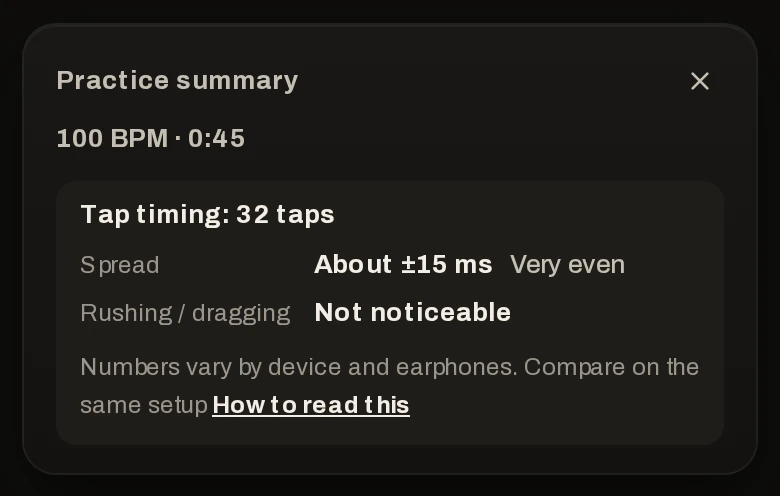
The numbers vary by device and earphones, so compare them on the same setup. Every number is a difference, so always tapping slightly early does not change the results.